Manufacturing Software Development: ERP Modules, Customization, Cost and Process
Most manufacturers already run an ERP. The trouble starts where the ERP stops: the shop floor, the quality lab, the distributor network, the approval that still lives in email. Manufacturing software development closes those gaps by configuring and extending the ERP or building the pieces no product covers well.
Spending reflects it. Mordor Intelligence sizes the manufacturing ERP market at $6.36 billion in 2026, rising to $10.17 billion by 2031, a 9.84% annual growth rate. Small and mid-sized manufacturers are the fastest-growing group at 17% a year. Estimates differ widely between research firms because each defines the market differently.
This guide explains what ERP does in a factory, how it differs from MES, MRP, WMS and QMS, which modules matter, when to customize, how to build, and what it costs.
The short version for plant and IT leaders:
- Buy or configure ERP for the standard work. Finance, procurement, inventory and core MRP are solved problems. Build or extend only the workflows that make your plant different.
- Customize at the edges, not the core. Keep the ERP upgrade-safe and put custom logic in connected apps that talk to it through APIs.
- Fix master data first. The item master, bills of materials, and routings decide whether every later module, report and AI model works.
- Go live in phases. Start with one module or one plant, usually for four to eight months, then expand.
What is manufacturing software development?
Manufacturing software development is the design, build and integration of software that plans, runs and records production. It covers the ERP that holds orders, stock, and costs; the systems that run the shop floor; and the apps that connect machines, people, and partners to both.
In practice, software development for manufacturing falls into three kinds of work:
- Configuring and extending an ERP. Setting up a commercial ERP around your products, plants and approval rules, then adding reports, workflows and apps around it.
- Building the missing systems. Shop-floor data capture, quality and inspection apps, maintenance, supplier and dealer portals, and dashboards that no licensed product covers well for your process.
- Integrating everything. Connect ERP to MES, machines, warehouses, CAD and PLM, e-commerce, tax portals, and BI, so you enter data once.
Most projects mix all three. Few manufacturers need a fully custom ERP; almost all need custom work around one.
What is an ERP system in manufacturing?
An ERP system in manufacturing is a factory's system of record. It holds one version of products, bills of materials, routings, stock, orders, suppliers, customers and costs, and links every department that touches them.
ERP in the manufacturing industry is easiest to understand by following one order through it:
- Demand arrives. A sales order, forecast or replenishment signal enters the ERP.
- MRP plans materials. The ERP explodes the bill of materials, nets stock and open orders, and proposes purchase and production orders.
- Procurement buys. Purchase orders go to suppliers; goods receipts update stock and trigger inspection.
- Production runs. Work orders are released to the shop floor with routings, and consumption and output are reported back.
- Quality checks. Record inspection results, lot status, and non-conformances against the batch or serial number.
- Goods ship. Stock is picked, packed and dispatched; the invoice is raised.
- Finance closes. Actual material, labour and overhead roll into product cost, variances and the ledger.
Manufacturing ERP vs standard ERP
A standard ERP manages money, purchasing, sales and people for any business. A manufacturing ERP adds the production layer: multi-level bills of materials, routings, work centres, capacity, lot and serial tracking, and product costing.
| Capability | Standard ERP | Manufacturing ERP |
| Bills of materials | Single-level kits at most | Multi-level BOMs, versions, alternates, scrap factors |
| Planning | Reorder points | MRP, capacity planning, master production schedule |
| Shop floor | None | Work orders, routings, work centres, labour and machine time |
| Traceability | Item level | Lot, batch and serial genealogy from supplier to customer |
| Quality | Basic returns | Inspection plans, holds, non-conformance, CAPA |
| Costing | Purchase price | Standard, actual or activity-based product cost with variances |
The practical difference depends on how much customization you need. A generic ERP used in a factory needs heavy customization to reach the right-hand column, which raises costs and makes upgrades harder.
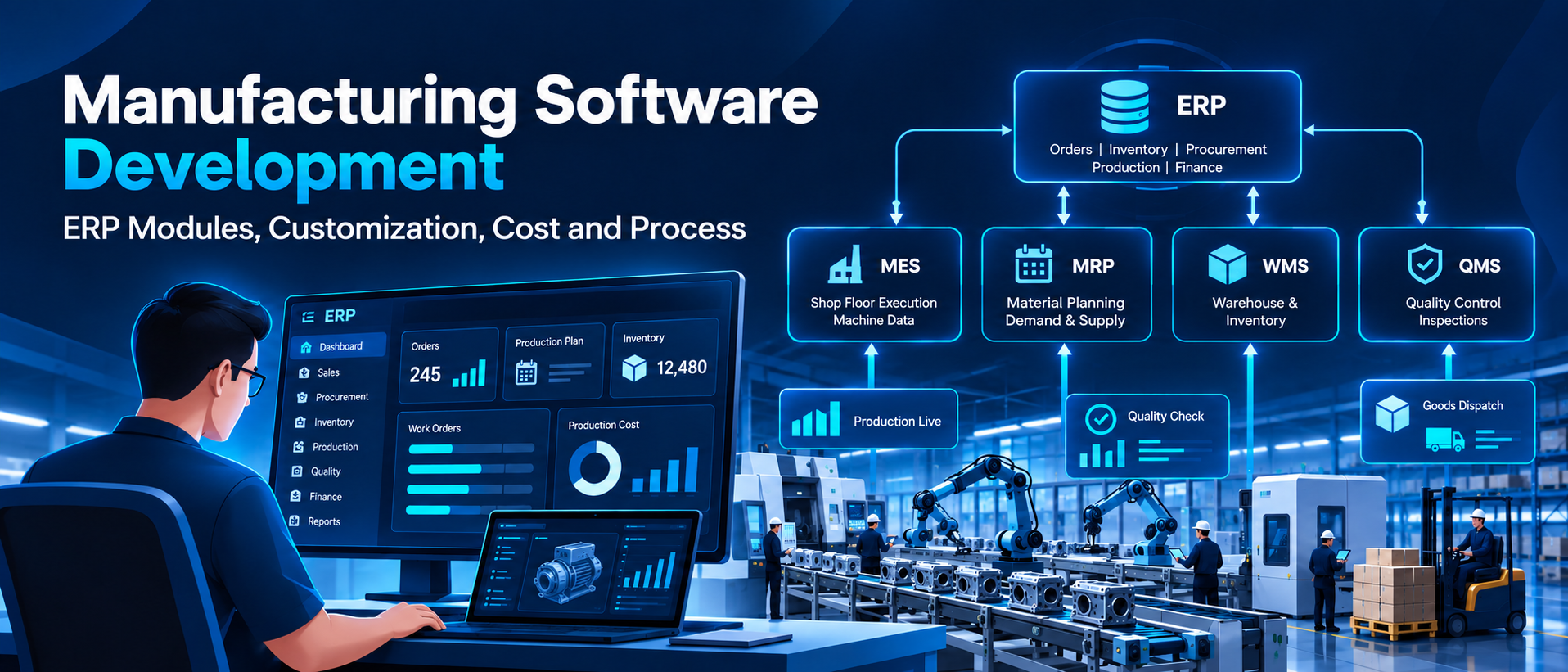
ERP vs MES vs MRP vs WMS vs QMS: how manufacturing systems fit together
ERP plans and records the business; the other systems run the plant. The ISA-95 standard assigns each system a level, and those levels determine what talks to what.
ISA-95 levels · where ERP, MES and SCADA sit
ERP sends orders, bills of materials and schedules down to operations, and operations sends actuals back up. Machine data crosses the IT/OT boundary only through a gateway, never the other way.
| System | Main job | Time horizon | Usual owner | Where it lives |
| ERP | Plan and record orders, stock, cost and finance | Days to months | Finance, planning, supply chain | SAP S/4HANA, Oracle, Microsoft Dynamics 365, Odoo |
| MRP | Calculate what to buy or make, and when | Days to weeks | Planners | A module inside most ERPs |
| MES | Dispatch work and record what happened on each line | Shifts to seconds | Production, plant IT | Standalone, or custom-built |
| WMS | Control receiving, storage, picking and dispatch | Hours to minutes | Stores, logistics | ERP module or standalone |
| QMS | Inspection, holds, non-conformance, CAPA, audits | Per lot or event | Quality | ERP module or standalone |
| SCADA | Monitor and control machines and process units | Seconds | Automation engineers | Vendor control systems |
Smaller plants often run ERP alone and capture shop-floor data on tablets. Plants with many machines, short cycles or strict traceability usually need an MES or a custom shop-floor layer between ERP and the machines.
Types of manufacturing ERP by production mode
The right ERP system for manufacturing depends first on how you make things. Choose by production mode before you compare vendors; a system built for one mode needs costly customization to run another.
| Production mode | Typical industries | What the ERP must handle well |
| Discrete | Automotive parts, machinery, electronics, appliances | Multi-level BOMs, routings, serial numbers, engineering changes |
| Process | Food, pharma, chemicals, paints, cosmetics | Recipes and formulas, batch and potency, co-products, shelf life, batch records |
| Mixed mode | FMCG, consumer durables, packaging | Process stages feeding discrete packing lines in one plan |
| Make-to-order and engineer-to-order | Capital equipment, tooling, fabrication | Configurators, project costing, engineering BOMs, milestone billing |
| Make-to-stock and repetitive | High-volume consumer goods, components | Forecasting, rate-based scheduling, backflushing, kanban |
| Job shop and high-mix | Contract machining, precision parts | Quick quoting, finite scheduling, job costing, routing per order |
Many plants run two modes at once, such as a process kitchen feeding a discrete packing hall. That is where off-the-shelf systems strain and targeted custom development pays off.
Manufacturing ERP modules: what each does and when to add it
A manufacturing ERP is a set of modules on one database. Roll them out in three waves: the core that every plant needs on day one, the production layer, and the advanced layer once data is clean.
| Module | What it does | Key data it owns | Wave |
| Finance and accounting | Ledger, payables, receivables, tax, consolidation | Chart of accounts, cost centres | 1 |
| Procurement | Requisitions, purchase orders, supplier rating, contracts | Supplier master, price lists | 1 |
| Inventory and warehouse | Stock by location, lot and serial, transfers, cycle counts | Item master, stock ledger | 1 |
| Sales and order management | Quotes, orders, pricing, schemes, dispatch, invoicing | Customer master, price lists | 1 |
| Bill of materials and engineering | Multi-level BOMs, versions, engineering change orders | BOMs, routings | 1 |
| MRP and production planning | Material plans, master production schedule, capacity checks | Planned orders | 2 |
| Shop floor control | Work orders, operation reporting, labour and machine time | Work orders, actuals | 2 |
| Quality management | Inspection plans, holds, non-conformance, CAPA, certificates | Inspection results | 2 |
| Costing | Standard and actual cost, variances, cost roll-ups | Cost estimates | 2 |
| Maintenance (CMMS) | Preventive and breakdown work orders, spares | Equipment master | 2 |
| Traceability and genealogy | Forward and backward trace by lot or serial | Batch records | 2 |
| CRM and dealer portal | Leads, service tickets, distributor and dealer orders | Contacts, cases | 3 |
| Analytics and BI | KPI dashboards, OEE, plan vs actual | Data warehouse | 3 |
| EHS and compliance | Permits, incidents, audits, statutory registers | Incident and permit records | 3 |
Industry-specific add-ons sit on top: product configurators for engineer-to-order, recipe management for process plants, and supplier portals for automotive tiers. For a deeper look at a mid-market option, see our guide to SAP Business One.
ERP for the manufacturing industry: sector requirements
Each sector adds rules the ERP must support, and those rules drive much of the customization budget. Which rules apply depends on your products, markets and processes, so confirm the list with your quality and regulatory team before choosing a platform or partner.
| Sector | Rules that may apply | What the software usually needs |
| Automotive and auto components | IATF 16949 where OEM customers require it; customer-specific requirements; PPAP submissions | Part and lot traceability, control plans, supplier quality, EDI delivery schedules |
| Pharma and life sciences | FDA 21 CFR Part 11 for electronic records that FDA rules require; EU GMP Annex 11 for computerised systems in EU-regulated manufacture; revised Schedule M for drug manufacturers in India | Electronic signatures, audit trails, electronic batch records, validated release steps |
| Medical devices | ISO 13485 where regulators or customers require it; unique device identification rules in the US and EU | Device history records, serial genealogy, complaint handling |
| Food and beverage | FSMA Section 204 traceability rule for foods on FDA's Food Traceability List; HACCP-based food safety plans; FSSAI licensing and labelling in India | Lot trace from supplier to shelf, allergen control, shelf-life and expiry tracking |
| Chemicals and paints | GHS-based safety data sheets and labels; EU REACH for substances placed on the EU market | Formula management, hazard labels, potency-based batching |
| Electronics | EU RoHS and REACH for products sold in the EU; customer serialisation requirements | Component traceability, approved alternates, compliance certificates per lot |
| Aerospace and defence | AS9100 where customers require it; export control rules | Serialised genealogy, first-article inspection, configuration control |
| FMCG and consumer goods (India) | GST e-invoicing above the notified turnover threshold; e-way bills; Legal Metrology rules for packaged goods | Distributor and scheme management, batch-wise pricing, secondary sales visibility |
Two references cut across sectors. ISA/IEC 62443 is a widely used standard series for securing industrial automation and control systems, and becomes relevant once ERP or apps connect to plant networks. ISO 9001 underpins most quality systems. Treat this table as a planning aid, not legal advice.
Buy, configure, extend, integrate or build: choosing the right path.
Buy the standard, build the difference. Most manufacturers end up on paths 2 to 4 below; a fully custom ERP (path 5) is right only for a narrow set of businesses.
| Path | What it means | Best when | Typical first release | Watch out for |
| 1. Buy and adopt | Use a packaged ERP close to its standard processes | Processes are standard and you can change them to fit | 3 to 6 months | Workarounds in spreadsheets where the fit is poor |
| 2. Configure | Set up ERP rules, workflows, forms and reports without code | The ERP covers about 80% of needs out of the box | 4 to 9 months | Over-configuration that nobody documents |
| 3. Extend | Build apps beside the ERP that read and write through its APIs | A few workflows are unique: shop floor, quality, dealer portal | 3 to 5 months per app | Extensions that bypass ERP rules and corrupt data |
| 4. Integrate | Connect existing ERP, MES, machines and portals so data flows once | Systems already exist but do not talk to each other | 3 to 6 months | Point-to-point links that break on every upgrade |
| 5. Build custom | Develop your own manufacturing ERP or core modules | The process itself is your edge, or licence cost outgrows the value at your scale | 6 to 12 months for a phased core | Rebuilding finance and tax that a package already does well |
Use four tests to decide:
- Is the process the same at every competitor? Then buy it. You don't win on the general ledger, payroll, or standard purchasing.
- Do operators keep paper or spreadsheets beside the ERP? That is the workflow to extend or build.
- Does the data exist in two places? That is an integration project, not a new system.
- Does licence cost grow faster than value? At high user or plant counts, owning extensions can cost less than renting more seats.
If you already run SAP, start with SAP implementation and support and extend around it. If the current system is old and heavily patched, read our guide to legacy application modernization before choosing.
Manufacturing ERP customization: what to change and what to leave alone
Good manufacturing ERP customization changes the edges and leaves the core standard. Every change to core code adds cost to every future upgrade, so pick the lowest tier that solves the problem.
| Tier | What it covers | Examples | Upgrade risk |
| 0. Configuration | Settings the vendor supports | Plants, units, approval limits, number ranges | None |
| 1. Personalisation | Layouts, forms, reports, dashboards | Batch record print, shift production report | Very low |
| 2. Platform low-code | Workflows and logic in the vendor's own toolkit | SAP BTP, Microsoft Power Platform, Odoo Studio, NetSuite SuiteScript | Low |
| 3. Side-by-side extension | Separate apps that use ERP APIs or events | Shop-floor tablet app, supplier portal, quality inspection app | Low to medium |
| 4. Core modification | Changing the ERP's own code or tables | Rewriting MRP logic, altering posting rules | High: avoid |
These areas are usually worth customizing in a factory:
- Shop-floor screens built for gloves, noise and shift changes, with offline mode
- Quality inspection checklists, photo evidence and hold or release rules
- Product configurators for make-to-order and engineer-to-order quotes
- Approval chains that match your delegation of authority
- Dealer, distributor and supplier portals
- Plant-specific reports, labels and batch records
These areas should stay standard: ledger posting, tax calculation, standard costing logic and core MRP netting. Vendors maintain them for legal and accounting reasons, and custom versions break at the next statutory change.
Three controls keep customization in check:
- A fit-gap document that records each gap, the tier chosen and why lower tiers would not work.
- A customization register with an owner, a test script and an upgrade note for every item.
- Automated regression tests run before each ERP update. Our QA and testing guide covers how to set these up.
Architecture and tech stack for manufacturing software
Modern manufacturing software is built in layers, and the integration layer is where most projects run late. Decide each layer explicitly before development starts.
| Layer | What sits in it | Common choices |
| Machines and edge | PLCs, sensors, scanners, scales, tablets on the line | OPC UA, MQTT and Modbus gateways; barcode and RFID; Flutter or native apps |
| Ingestion and messaging | Machine data, ERP events, partner files | Kafka or RabbitMQ; Azure IoT Hub or AWS IoT Core; EDI translators |
| Data | Transactions, time-series, documents, analytics | PostgreSQL or SQL Server; a time-series database; a cloud data warehouse |
| Application services | Work orders, quality, planning, portals, approvals | .NET, Java, Python or Node.js services with REST APIs |
| Experience | Operator screens, manager dashboards, partner portals | React or Angular web apps; Power BI or similar for reporting |
| Intelligence | Forecasting, anomaly detection, vision, document AI | Python ML models; retrieval-based assistants over SOPs and batch records |
Architecture style matters too. A modular monolith often delivers faster for a single plant; services pay off when multiple plants and teams change the system at once. Our comparison of monolithic and microservices architecture explains the trade-off.
Integration checklist
Map every connection before design. Each line below is a project risk if it is discovered late.
| System | Typical method | Direction | Timing |
| ERP core (SAP, Oracle, Microsoft Dynamics, Odoo) | REST or OData APIs, IDocs, middleware | Both ways | Near real time |
| MES and shop floor | APIs or message queue | Both ways | Real time |
| PLC and SCADA | OPC UA or MQTT through a gateway | Read only into IT | Streaming |
| CAD and PLM | BOM export, PLM APIs | Into ERP | On engineering change |
| WMS and scanners | APIs, barcode events | Both ways | Real time |
| Suppliers and OEM customers | EDI, supplier portal | Both ways | Daily or per order |
| Tax and e-invoicing portals | Government APIs through a GST Suvidha Provider in India | Out, with acknowledgement back | Per invoice |
| CRM, dealer and e-commerce | APIs, webhooks | Both ways | Near real time |
| BI and data warehouse | Scheduled extracts or change data capture | Out of ERP | Hourly or daily |
One rule is non-negotiable: business applications never write directly to control systems. Machine data flows up through a brokered, read-only path; commands to equipment stay inside the OT network.
How to develop manufacturing ERP software: an 8-step process
Start with one plant and one painful workflow, prove it on the floor, then widen. Each step below ends with a deliverable you can review before paying for the next.
- Walk the floor (2 to 4 weeks). Shadow planners, storekeepers, supervisors and quality inspectors. Record every paper form, spreadsheet and handoff.
- Deliverable: current-state process map and a problem list with today's numbers, such as hours spent on daily reports.
- Set targets and scope (1 to 2 weeks). Select 3 to 5 KPIs the project must move, and the plants and modules in phase one.
- Deliverable: one-page business case and phase plan.
- Run a fit-gap against the chosen path (2 to 4 weeks). Compare needs with the ERP's standard functions and assign each gap a customization tier.
- Deliverable: fit-gap document and customization register.
- Fix master data (in parallel, 4 to 8 weeks). Clean items, units, BOMs, routings, work centres, suppliers and opening stock.
- Deliverable: validated master data and an owner for each data set.
- Design architecture and integrations (2 to 4 weeks). Agree the stack, every interface, data ownership, security and failure behaviour.
- Deliverable: architecture diagram and interface specifications.
- Build in short releases (3 to 6 months). Ship a working slice every two weeks, test with real users on real devices, and connect integrations early.
- Deliverable: tested releases, test scripts and user guides.
- Pilot, then cut over (4 to 8 weeks). Run one line or plant in parallel with the old process, reconcile stock and cost daily, then switch at a month-end with a rollback plan.
- Deliverable: signed cutover checklist and reconciliation report.
- Support and improve (ongoing). Keep hypercare on every shift for the first month, review KPIs monthly, and plan the next module from usage data.
- Deliverable: support SLA, KPI report and next-phase backlog.
Security testing belongs inside steps 6 and 7. Run vulnerability assessment and penetration testing before the pilot touches live production data. For more on lifecycle choices, see what is SDLC.
Manufacturing software development cost and timeline
Budget follows effort. At a blended offshore rate of about $3,000 per person-month, a single connected app costs roughly $36,000 to $90,000, and a phased custom ERP core $216,000 to $630,000. These are indicative planning figures, excluding ERP licences; they are not standard market prices or a quotation, and a real estimate requires a discovery phase to confirm scope, integrations, and data quality.
| Scope | Example | Team | Timeline | Person-months | Indicative budget (USD) |
| Single app around an existing ERP | Shop-floor data capture or quality inspection app | 4 to 6 | 3 to 5 months | 12 to 30 | 36,000 to 90,000 |
| Packaged ERP implementation, one plant | Configure, migrate and train on a mid-market ERP | 5 to 8 | 4 to 8 months | 20 to 64 | 60,000 to 192,000 plus licences |
| Integration programme | ERP, MES, machines, scanners and portals connected | 5 to 8 | 4 to 8 months | 20 to 64 | 60,000 to 192,000 |
| Custom manufacturing ERP, phased core | Inventory, BOM, MRP, production, quality, costing on one data model | 8 to 14 | 9 to 15 months | 72 to 210 | 216,000 to 630,000 |
| Multi-plant platform with analytics and AI | Several plants, forecasting, OEE, vision-based quality | 12 to 20 | 12 to 24 months | 144 to 480 | 432,000 to 1,440,000 |
How these ranges are calculated
Every row uses the same formula, so you can rescale the table with your own vendor's rate:
\text{Budget} = \text{team size} \times \text{months} \times \text{blended monthly rate per person}
The $3,000 rate assumes an offshore or blended team. Published offshore benchmarks for a dedicated developer run from about $2,880 to $6,400 a month (Relia Software); onshore teams in the US or UK cost several times more. The ranges assume full-time teams for the whole timeline, so phased staffing usually brings the real figure down.
What moves a project up or down its band
- Number of integrations. Each ERP, MES, machine or portal interface adds weeks, mostly in testing.
- Production mode. Process and engineer-to-order plants need more logic than make-to-stock plants.
- Data migration. Cleaning years of item, BOM, and stock records is the most underestimated line item.
- Regulated validation. Pharma and medical device projects add formal validation documents and test evidence.
- Offline and device depth. Rugged tablets, scanners and true offline sync cost more than a web form.
- Sites and languages. Each extra plant adds training, cutover and support hours.
Five-year cost of ownership
The build is only the first line. Budget 15% to 20% of build cost each year for support and enhancements, plus hosting and any licences. At that rate, a $150,000 build needs about $22,500 to $30,000 a year, or $112,500 to $150,000 over five years, before hosting. Packaged ERP shifts the same money into annual subscriptions that rise with users and plants, so compare both options over five years, not one.
Want a ranged estimate for your own plant? Share your modules, plants and integrations, and our team will scope it in a short discovery call.
How to measure ROI: the KPIs that prove the system works
Measure before you build, or you cannot prove the return. Record a three-month baseline for each KPI during discovery, then report the same numbers monthly after go-live.
| KPI | How to calculate it | Module that moves it |
| Overall equipment effectiveness (OEE) | Availability × performance × quality | Shop floor control, maintenance |
| Schedule adherence | Orders finished on planned date ÷ orders planned | MRP and production planning |
| Inventory turns | Cost of goods sold ÷ average inventory value | Inventory, MRP |
| First-pass yield | Units passing first inspection ÷ units started | Quality management |
| On-time, in-full delivery | Orders shipped complete and on time ÷ orders shipped | Order management, planning |
| Material cost variance | Actual material cost − standard material cost | Costing, procurement |
| Days to close the month | Working days from month-end to signed accounts | Finance, costing |
| Data entry hours | Hours spent re-keying data between systems each week | Integrations |
OEE combines the three losses on a line into one number:
\text{OEE} = \frac{\text{run time}}{\text{planned time}} \times \frac{\text{ideal cycle time} \times \text{total count}}{\text{run time}} \times \frac{\text{good count}}{\text{total count}}
Tie each KPI to money before go-live. For example, one point of schedule adherence is worth the overtime and expediting it avoids. Our article on predictive analytics in supply chain shows how forecasting lifts inventory turns.
Why manufacturing ERP projects fail, and how to avoid it
Most failures are decided before the first line of code: by scope, data and ownership choices made in the first month. Watch for the early signs below.
| Failure | Early warning sign | Prevention |
| Requirements written in a meeting room | Nobody from the shop floor has seen a screen | Walk the floor first; test prototypes with operators |
| Dirty master data | BOMs and routings "fixed later" | Make data cleansing its own workstream with owners |
| Over-customizing the core | Gaps closed with code instead of process change | Use the customization tiers and a fit-gap sign-off |
| Integrations treated as a detail | "The ERP has an API" is the only specification | Write an interface spec with data contract, timing and failure behaviour |
| Big-bang go-live | All plants and modules on one date | Pilot one line or plant, run in parallel, then roll out |
| No owner after launch | Support handed to a ticket queue | Name a product owner and an SLA before go-live |
| Training as a one-off class | Users return to spreadsheets within weeks | Train super-users per shift and keep in-app help |
If you lack in-house ERP skills for parts of the project, ERP and enterprise application staff augmentation fills specific roles without a full outsourcing contract.
AI in manufacturing ERP: what works in 2026
AI adds value to a manufacturing ERP only after the data underneath is clean and connected. These five uses have the clearest payback today.
| Use case | What it does | Data it needs |
| Demand forecasting | Predicts demand by SKU, region and week to drive MRP | Two or more years of clean sales and shipment history |
| Predictive maintenance | Flags equipment likely to fail before a breakdown | Machine sensor data plus maintenance history |
| Vision-based quality inspection | Detects defects on the line from camera images | Labelled images of good and defective parts |
| Document AI | Reads supplier invoices, certificates of analysis and delivery notes into the ERP | Sample documents and the ERP fields they map to |
| AI agents and assistants | Answer questions over SOPs and batch records; draft purchase or production proposals for approval | Indexed documents and read access to ERP data |
Keep a person in the approval loop for anything that changes stock, orders or money. Triazine builds these capabilities as predictive analytics, AI-powered computer vision inspection, AI document processing and agentic AI services.
How Triazine Software helps manufacturers
Triazine configures SAP for manufacturers and builds software around the ERP, including distribution and sales platforms, safety and compliance, approval workflows, and integrations. We don't sell a packaged ERP of our own, so our buy-versus-build advice isn't tied to a licence.
| What manufacturers need | What Triazine has delivered | Proof |
| SAP for production, materials and finance | Implementation and support across SAP PP, MM, SD, FICO and HCM, plus S/4HANA migration | SAP implementation and support |
| Sell-through visibility for a manufacturer's distribution network | Secondary sales platform for Godfrey Phillips India: 1,660 distributors, 12.9 million+ transactions, live since 2021 | Secondary sales case study |
| Planning with approvals and an audit trail | Five-stage plan approval and month-by-month execution tracking for Godfrey Phillips India | Cycle planning case study |
| Plant safety, permits and incidents | PrimeEHS, used in automobile and engineering manufacturing, with SAP, Oracle and Dynamics connectors | PrimeEHS |
| Approvals that post into the ERP | Vendor bill workflow with multi-level approvals and ERP payment handoff for Aavantika Gas | Vendor bill management case study |
Triazine is appraised at CMMI Level 3, certified to ISO 9001:2015, and has delivered enterprise software for more than 11 years. We work on project, dedicated-team, and long-term support models, and provide QA and testing, cloud development and migration, and BI and reporting under one roof.
Planning an ERP extension, a shop-floor app or an integration programme? Talk to our team, explore our custom software development services, or see our FMCG and consumer goods work.
Frequently asked questions
What is ERP in manufacturing?
ERP in manufacturing is the system of record that links orders, materials, production, quality, inventory and finance in one database. It plans what to buy and make, tracks what was made and from which lots, and calculates what each product really cost.
What is manufacturing software development?
It is the design, build and integration of software that plans and runs production. It includes configuring and extending an ERP, building shop-floor, quality and portal apps, and connecting ERP to MES, machines and partners.
What is the difference between a manufacturing ERP and a standard ERP?
A standard ERP covers finance, purchasing, sales and HR. A manufacturing ERP adds multi-level bills of materials, routings, MRP, shop-floor control, lot and serial traceability, quality management, and product costing.
What is the difference between ERP and MES?
ERP plans and records the business: orders, stock, costs and schedules by day or week. MES runs the shop floor in minutes and seconds: dispatching operations, collecting machine and labour data, and enforcing work instructions; the two exchange orders and actuals.
Which manufacturing ERP modules should we implement first?
Start with finance, procurement, inventory, sales and bills of materials. Add MRP, shop floor, quality and costing next, then CRM, analytics and EHS once data is reliable.
Should we customize our ERP or build custom software?
Configure first, then extend with separate apps that use the ERP's APIs. Change the ERP's core code only as a last resort, because every change raises upgrade costs. Build a custom ERP only when your production process is your competitive edge.
How much does manufacturing ERP software development cost?
At a planning rate of about $3,000 per person-month with an offshore or blended team, a single connected app costs about $36,000 to $90,000, and a phased custom ERP core about $216,000 to $630,000. Add 15% to 20% of the build cost each year for support. Treat these as indicative ranges until a discovery phase confirms scope.
How long does it take to implement ERP for a manufacturing company?
A single connected app takes three to five months. A packaged ERP for one plant takes four to eight months. A custom ERP core takes nine to fifteen months and is delivered in phases.
















































 Get free quote